Posts

Showing posts with the label Form Builder

Case Study - One to Many Grid Form Design on Joget Workflow Form Builder
Image
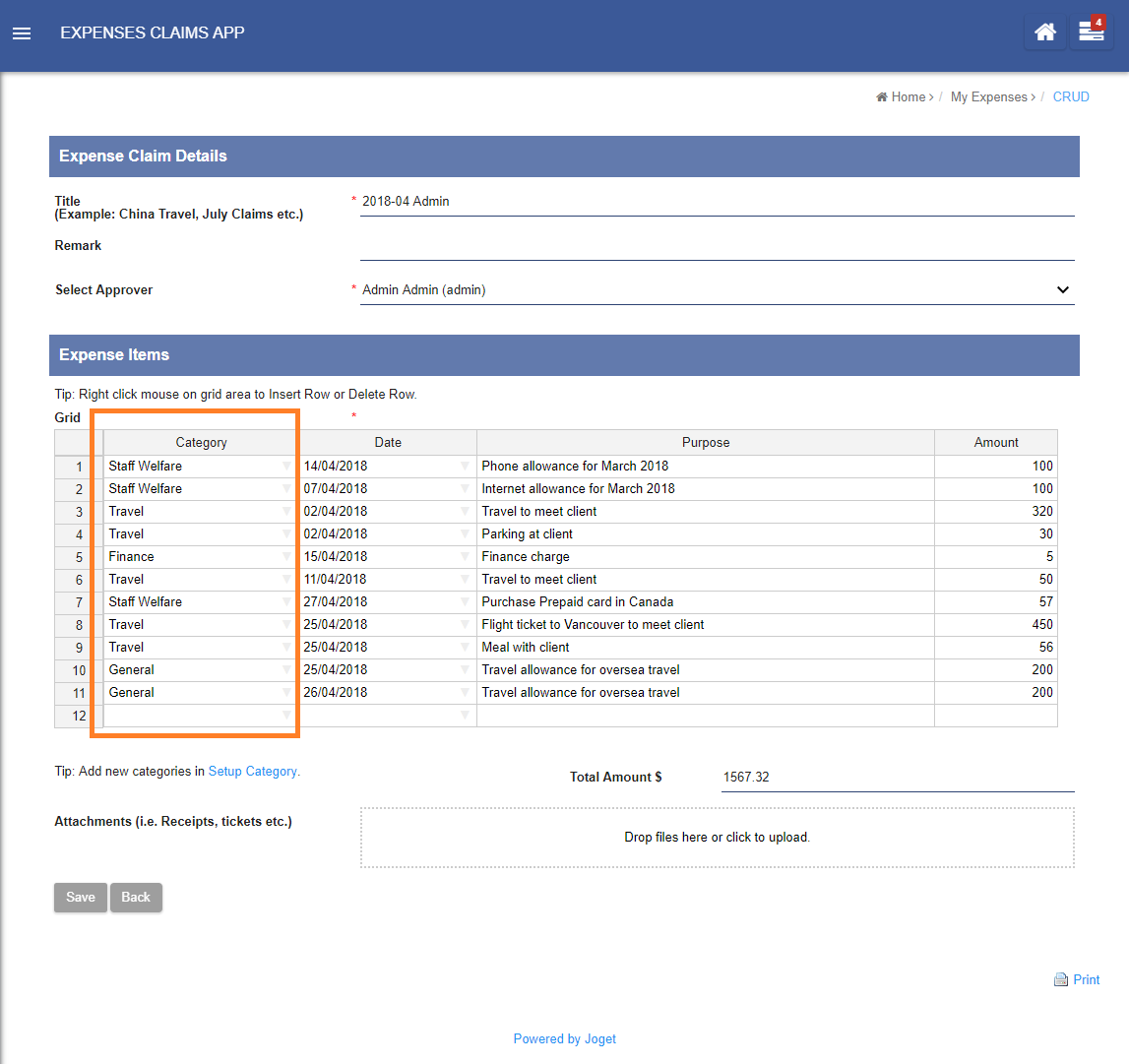
This post is a follow up from an earlier posting of Joget Workflow Form Builder - More than Just Workflow , in our quest to explore different kinds of form designs. Technical aspects discussed in this posting requires slight elevation of technical know-how, such as database table design and ERD (entity relationship diagram). In this case study, we shall use the default Expenses Claims App that comes bundled by default with every Joget Workflow installation, so that this article can double as a how-to guide for everyone to try it out. Let’s begin! When submitting a new claim, there’s a spreadsheet element to facilitate the entry of claim items. The spreadsheet element is a grid element where it establishes a one-to-many entity relationship between the claim and claim entry entities. Through the use of “Multirow Form Binder”, the claim form would be able to save the multirow data of spreadsheet into the “Expense Claim Entry” form table. “claim” is the foreign ke...

Joget Workflow Form Builder - More than Just Workflow

Image
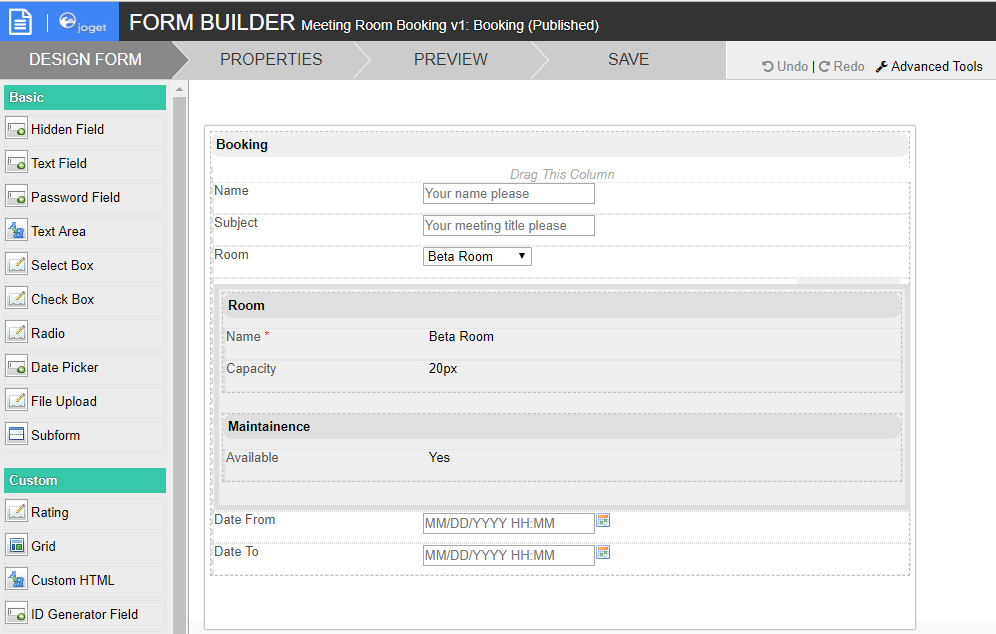
Over the years, we have received many requests from our customers and community on how to improve their applications built on top of our low-code/no-code platform, Joget Workflow. Ironically, the most requested feature is not actually about workflow. It is about the form. Evidently, as what we can see in our community , the most discussed feature is actually about forms. Process-related questions surprisingly comes in at a distant sixth place. With our recent release of Joget Workflow v6, we have added even more form related elements. The default build is now bundled with more than 30 form input elements. New form elements are being developed all the time. In order to meet our customers’ demand, new plugins are being introduced into Joget Marketplace . Check out one of our latest videos on how to make use of Joget Workflow to build a full fledged meeting room booking app, where the form builder plays an important role in integrating everything together. ...

The Joget Advantage: Things You Probably Didn't Know About Joget Workflow

Image
A few years ago, we published a post about the advantages of Joget Workflow and why everyone needed to pay attention to the platform. Back then, Joget Workflow was in its third edition and in the post, we talked about the key benefits offered by the v3. But years have come and gone and Joget Workflow has gone through a handful of upgrades and revisions, and new features have been added, too. More importantly, the platform has evolved from being just a workflow and business process management (BPM) engine to a full-fledged suite of tools for building business applications that matter. This simply means there are more things you can do with Joget Workflow now than we covered in the v3 post back in 2011. So we’re putting this together to help you have a more comprehensive knowledge of what you can accomplish with Joget Workflow, plus some major advantages associated with the platform. But before we get to that, let's quickly get a handle on what the platform is about, for thos...

What is the most exciting thing about Joget Workflow v5?

Image
Joget Workflow v5 comes with many new features and enhancements  You can view the full list of new features from the v5 knowledge base located here . So what is the most exciting v5 feature? For me it has to be the much enhanced App Generator. Imagine, generate a production ready Joget Workflow app in minutes. It has opened up new possibilities for developers ( citizen or otherwise) and business users to greatly speed up their Enterprise app development process. Not just for prototyping but for delivering full functioning production applications. Well, exactly how is the latest App Generator exciting compared to v4 or to other agile development platform. Here is what I put forward. Low-Code Platform First of all, the App Generator made it's first appearance in Joget Workflow v4 beta back in 2013. It was ground breaking in that it allowed users to create a form and from the form, generate a full-fledged functioning web app with or without a workflow approval cycle. And al...

Joget Workflow Training – Basic & Advance for v3.1 – Module 6 – Using the Email Tool

We are making our training slides available online. This set of training slides is based on the Joget Workflow v3.1 version. This would be another good avenue for those who are looking for more learning materials to create more values for their organizations. In this sixth module, we will be learning on how to map the existing process's Tool node to one of the many available Process Tool plugins . We will be learning on how to configure the Email Tool to send out Email as part of the Workflow Process flow. Joget Workflow Training – Basic & Advance for v3.1 – Module 6 – Using the Email Tool from Joget Workflow This is the complete listing of all the modules. Module 1: Introduction Introduction to Business Process and Workflow Introduction to Joget Workflow Overview of Joget Workflow v3 Architecture Module 2: Setting up Joget Workflow Requirements Installation Overview of User Management   Module 3: Building your first Process-driven Applicatio...

Joget Workflow Training – Basic & Advance for v3.1 – Module 5 – Creating your first Forms

Image
We are making our training slides available online. This set of training slides is based on the Joget Workflow v3.1 version. This would be another good avenue for those who are looking for more learning materials to create more values for their organizations. This is the fifth out of 11 modules that will be posted online every few days. In this module, we will be learning about the Form Builder. The Form Builder is the second component of 4 components in Joget. In Joget, the 4 components are:- Workflow engine Form Datalist Userview In Form Builder module, we will be learning the following:- Naming convention for table naming in Form Builder itself. Form to Activity mapping for Workflow Process Creation of Form with basic input elements such as Text Field, Date Picker, and Textarea. Subform concept in Form Builder to refer to existing form. Workflow Process flow control using Form Builder's input element. Joget Workflow Training – Basic & Advance fo...

Form Builder - Hidden Field - Data Priority

Image
Effectively from Joget 3.1.0 onwards, we have added in "Data Priority" option to the Hidden Field to cater to more use cases on the handling of data. Data Priority option in Joget 3.1.0 and onwards Data Priority determines on which value to be taken into consideration. There are 3 options with their own data precedence to cater to different use cases. Prioritization option in Joget version prior to 3.1.0  This would mean that we are replacing a very simplistic option available in prior version of Joget as depicted above.

Popular Posts

Transforming Customer Onboarding: How Allied Benefit Systems Achieved Reporting Accuracy and Streamlined Business Processes with No-code/Low-code.

Check Out Our New Blog Location!

Joget DX 8 General Availability: Elevate Digital Transformation with Advanced UX and Governance Features

Superapps in the Enterprise: Up, Up and Away!

What Are We Brewing for Joget Workflow v3?